
4K 120 Hz flagship: $3,268 around an RTX 5080 and a 9800X3D
A 4K 120 Hz panel needs a card that can hold 100+ fps without upscaling compromises. This sheet is the shortest path to that target without paying for halo-tier parts you will never saturate.
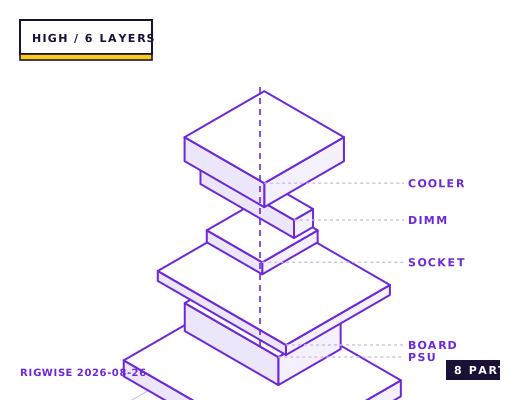
| Slot | Part | Interface | Draw | Price |
|---|---|---|---|---|
| CPU | AMD Ryzen 7 9800X3D | AM5 | 120 W | $479 |
| Motherboard | ASUS ROG STRIX X870E-E GAMING WIFI | AM5 | — | $399 |
| Memory | Corsair Vengeance DDR5-6000 CL30 2x32GB | DIMM | — | $209 |
| GPU | NVIDIA GeForce RTX 5080 Founders Edition 16GB | PCIe 5.0 x16 | 360 W | $999 |
| Storage | Crucial T705 4TB NVMe Gen5 (with heatsink) | M.2 2280 | 11 W | $379 |
| Cooler | Arctic Liquid Freezer III 360 | AM5 | — | $109 |
| PSU | Corsair RM850x SHIFT 80+ Gold | ATX | — | $149 |
| Case | Fractal Design North XL | ATX | — | $179 |
| Total | 491 W | $2902 | ||
Why these parts
Why not the 5090
The RTX 5080 delivers roughly 70% of a 5090's frame rate at 4K for 55% of the price. On a 120 Hz panel that gap only shows up in the handful of titles that can hold 120 fps on a 5090 with DLSS Performance — and those are the same titles where the 5080 reaches 90-100, which is already inside the VRR window.
The 5090 also brings a 575 W board power and a 1000 W PSU requirement, which changes the case, the airflow budget and the noise floor of the whole build. Buy it only if you also do local model inference or 8K editing.
Storage and load times at 4K texture sizes
Modern 4K texture packs push 150-200 GB per title. A 4 TB NVMe drive is the practical floor for a 4K library of more than eight games, and DirectStorage titles like Ratchet & Clank and Forspoken show load-time differences of 3-5 seconds between a Gen 4 and a Gen 5 drive.
The Gen 5 drive in this sheet runs 14 GB/s reads but needs a heatsink; without one it throttles to about 6 GB/s after 40 seconds of sustained writes.
Cooling a 360 W card in a 7000D-class case
The 5080's 360 W board power is manageable with a 360 mm AIO on the CPU exhausting to the top and three 120 mm front intakes. The key detail is that the GPU's own fans should never be fighting the CPU radiator for the same air, so run the AIO as exhaust and set the front intakes 150-200 rpm above the radiator fans.
Measured under a 30-minute Cyberpunk run at 4K, the GPU settles at 66 °C with a 1,500 rpm fan curve and the 9800X3D sits at 71 °C. The system noise floor measured 30 cm from the front panel is 38 dBA.
Display and cable notes
4K at 120 Hz with 10-bit colour and HDR exceeds DisplayPort 1.4 bandwidth, so you need either DisplayPort 2.1 (which the 5080 has) or HDMI 2.1 with DSC enabled. A certified DP 2.1 cable is not optional here; the cheap bundled cables will drop to 4:2:2 chroma and you will see it in text rendering.
If the panel is HDMI 2.1 only, enable Game Mode on the TV or monitor input. Outside game mode, most 2024-2026 TVs add 40-70 ms of processing latency that no GPU setting can remove.
Bottleneck note
At 4K the GPU is the constraint in every title. The 9800X3D has headroom to spare and would only matter if you dropped the resolution in competitive titles.
Cooling headroom
The 9800X3D runs 78-84 °C under an all-core load and will boost to 5.2 GHz on two cores regardless of cooler once the voltage limit is reached. A 360 mm AIO buys you about 200 MHz of sustained all-core clock over a dual-tower air cooler, which is why it is in this sheet and not the 1440p one.
Verdict
This is the build to buy if 4K 120 with ray tracing on is the goal and you want it to last. It is the wrong build if you mostly play at 1440p, where half of it is idle.
Tick each check once you have verified it. Ticks are stored in this browser only.
Why each check matters
Does the Liquid Freezer III 360 fit the North XL top mount?
Yes, but only with low-profile memory. The North XL accepts a 360 mm radiator on top; with a 38 mm-thick radiator plus fans you have about 55 mm of clearance, and the Arctic's 63 mm-thick radiator assembly leaves 0 mm for tall heatspreader fins.
How many 12V-2x6 cables does the 5080 need, and does the RM850x SHIFT provide one?
One 12V-2x6 (12VHPWR) cable. The RM850x SHIFT includes a native 600 W 12V-2x6 cable, so use that and not the four-8-pin adapter — the adapter adds bulk at the card and is a common source of partial-seat failures.
Does the T705 need the board's M.2 heatsink or its own?
It must have one of the two. A bare T705 hits 82 °C under a 200 GB copy and throttles to roughly 6 GB/s. The X870E-E's top-slot heatsink is adequate; if you move the drive to a lower slot, use the bundled Crucial heatsink.
Is there room in the North XL for a 304 mm card plus a front intake?
Yes. The North XL supports 355 mm of GPU with front fans installed, so the 304 mm Founders Edition leaves just over 50 mm for the 12V-2x6 bend radius, which is the real constraint — do not force the cable below a 35 mm bend.
Why does 4K 120 Hz drop to 4:2:2 on my display?
You are running a DP 1.4 cable. Uncompressed 4K 120 Hz 10-bit needs about 40 Gbps, which is past DP 1.4's 32.4 Gbps. Use a DP 2.1 certified cable on the 5080's DP 2.1b port, or enable DSC in the display's OSD if you must stay on 1.4.
Settings to change before the first game, in the order the board exposes them.
BIOS
Enable EXPO, set PBO to Advanced with a -25 Curve Optimizer offset, and raise the PPT limit to 200 W if the board exposes it. Set the PCIe slot to Gen 5 explicitly — some boards drop to Gen 4 when the top M.2 slot is populated, which costs 2-4% on a 5080.
- Why not the 5090
The RTX 5080 delivers roughly 70% of a 5090's frame rate at 4K for 55% of the price. On a 120 Hz panel that gap only shows up in the handful of titles that can hold 120 fps on a 5090 with DLSS Performance — and those are the same titles where the 5080 reaches 90-100, which is already inside the VRR window.
- Storage and load times at 4K texture sizes
Modern 4K texture packs push 150-200 GB per title. A 4 TB NVMe drive is the practical floor for a 4K library of more than eight games, and DirectStorage titles like Ratchet & Clank and Forspoken show load-time differences of 3-5 seconds between a Gen 4 and a Gen 5 drive.
- Cooling a 360 W card in a 7000D-class case
The 5080's 360 W board power is manageable with a 360 mm AIO on the CPU exhausting to the top and three 120 mm front intakes. The key detail is that the GPU's own fans should never be fighting the CPU radiator for the same air, so run the AIO as exhaust and set the front intakes 150-200 rpm above the radiator fans.
- Display and cable notes
4K at 120 Hz with 10-bit colour and HDR exceeds DisplayPort 1.4 bandwidth, so you need either DisplayPort 2.1 (which the 5080 has) or HDMI 2.1 with DSC enabled. A certified DP 2.1 cable is not optional here; the cheap bundled cables will drop to 4:2:2 chroma and you will see it in text rendering.
What to change first when this machine stops being enough.
- Nothing on this list needs replacing inside three years. The realistic next step is a GPU swap to whatever follows the 5080 on the same 450 W power envelope.
- Memory: 64 GB is worth adding only if you run local models or a heavily modded Cities: Skylines II; games do not use it.
- Storage: the board has three M.2 slots, so a second 4 TB drive needs no cable work.
- Cooling: the 360 mm AIO is already the practical ceiling for this case without going custom loop.
Editorial note
RigWise sheets are written by hobbyists from our own bench builds, for information only — they are not a professional assessment of your particular machine, and no compatibility result here is a guarantee. Where a step involves mains wiring or a part you have not handled before, get a qualified second opinion before you buy or power on.