
4-bay NAS and media server: $1,187 with ECC, hardware transcoding and 40 TB usable
A prebuilt four-bay NAS with comparable specs costs $600 more and cannot transcode more than two 4K streams. This build runs a 4-bay array in a compact case with enough CPU for real-time transcoding and enough memory for ZFS.
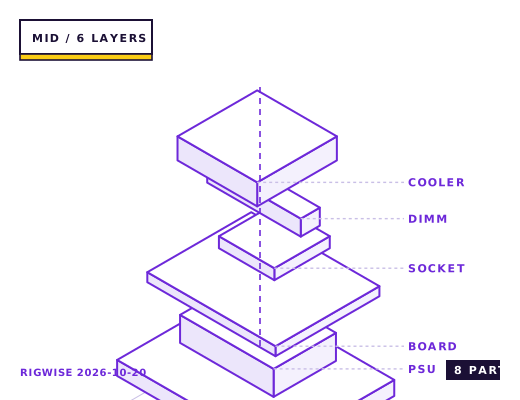
| Slot | Part | Interface | Draw | Price |
|---|---|---|---|---|
| CPU | Intel Core i5-14500 (Quick Sync for hardware transcoding) | LGA1700 | 65 W | $239 |
| Motherboard | ASRock Rack E3C256D4U-2L2T (ECC, 2x 10GbE) | LGA1700 | — | $329 |
| Memory | Kingston Server Premier DDR4-3200 ECC UDIMM 2x16GB | DIMM | — | $129 |
| GPU | None — Quick Sync handles transcoding | — | — | — |
| Storage | 4x Seagate IronWolf 16TB HDD + 1x WD Red SN700 500GB NVMe (boot/cache) | SATA / M.2 2280 | 34 W | $289 |
| Cooler | Noctua NH-L9i-17xx (low profile) | LGA1700 | — | $55 |
| PSU | Corsair RM550x 80+ Gold | ATX | — | $89 |
| Case | Jonsbo N3 (4-bay ITX NAS chassis) | ITX | — | $57 |
| Total | 99 W | $1187 | ||
Why these parts
Why ECC and ZFS in a home box
ZFS checksums every block, which means a single flipped bit in memory during a scrub can corrupt data that ZFS then writes back believing it is repairing it. ECC memory removes that failure mode for about $60-90 of premium over non-ECC.
The practical minimum for ZFS is 16 GB, and the recommendation with deduplication or a large ARC is 32 GB. This build uses 32 GB of unbuffered ECC, which the ASRock Rack board supports natively.
The transcoding question
An Intel CPU with Quick Sync handles four simultaneous 4K H.265 to 1080p transcodes in hardware. An AMD chip without integrated graphics has to do it in software, which limits you to one stream on a 6-core part.
This is the single reason the build uses a Core i5-14500 rather than a Ryzen 5. You do not need a discrete GPU for transcoding, and adding one would add 20-30 W of idle draw plus a fan that runs continuously.
Drive layout and the 3-2-1 problem
Four drives in RAIDZ1 gives 3 drives of usable capacity, so four 16 TB drives yield about 43 TB usable. RAIDZ1 tolerates one drive failure, and with 16 TB drives a rebuild takes 20-30 hours during which the array is vulnerable — which is why a mirrored pair of drives for critical data plus cloud backup for the irreplaceable subset is the safer plan.
Use NAS-specific drives. Desktop drives park their heads aggressively and have a load-cycle rating of about 300,000 cycles, versus 600,000 for NAS drives with rotational vibration sensors in a four-bay chassis.
Power and noise in a living space
A four-drive array with the drives spun up draws 55-65 W; with spin-down enabled it idles at 25-30 W. Over a year at US average prices that is about $70 versus $30, which makes spin-down worth configuring even though it adds a two-second wake latency.
Noise: four 7,200 rpm drives in a small case produce 32-36 dBA. Put the machine in a closet or a basement if you can. If it has to live in a room, use 5,400 rpm drives — the sequential throughput loss matters far less than the noise floor for a home media server.
Bottleneck note
Performance is not the constraint on a home NAS. The two real limits are the number of drive bays and the network link — a 1 GbE connection caps you at 113 MB/s, which is slower than a single modern hard drive.
Cooling headroom
Four drives dissipate about 28 W combined at idle and 40 W under load. A single 120 mm front intake at 800 rpm holds them at 34-38 °C, which is inside every manufacturer's spec. Above 45 °C drive life drops measurably, so do not run this case with the front filter clogged.
Verdict
A capable, quiet, repairable home server for less than a comparable prebuilt. Budget the weekend to set it up properly.
Tick each check once you have verified it. Ticks are stored in this browser only.
Why each check matters
How do I confirm ECC is actually active and not just installed?
Check the BIOS setting first (it is off by default on many boards), then verify in the OS with `dmidecode -t 17` looking for 'Error Correction Type: Single-bit ECC', or `edac-util -v` on Linux. Installing ECC memory without enabling it in firmware gives you none of the benefit.
Is RAIDZ1 safe with four 16 TB drives?
It tolerates one failure, but a rebuild on 16 TB drives takes 20-30 hours with the array degraded. If a second drive fails in that window, everything is lost. For data you cannot re-download, use RAIDZ2 or mirrored pairs.
Why does my NAS only transfer at 113 MB/s?
That is the practical ceiling of a 1 GbE link (1,000 Mbps divided by 8, minus overhead). A single modern hard drive does 200-260 MB/s sequentially, so the network is the bottleneck. A 2.5 GbE card raises it to about 280 MB/s.
Does the Jonsbo N3 have room for four drives plus a boot SSD?
Yes — four 3.5-inch bays plus two 2.5-inch mounts. But the ASRock Rack board has only four SATA ports, so if you use all four for the array the boot drive must be the M.2 NVMe, not a SATA SSD.
Does drive spin-down shorten drive life?
The load-cycle rating accounts for it: NAS drives are rated for 600,000 load cycles, which at 20 spin-downs a day is over 80 years. Configure a 30-minute idle timer and let them park.
Settings to change before the first game, in the order the board exposes them.
BIOS
Enable ECC in the BIOS (it is often default-off on consumer boards even when the memory supports it), set the SATA mode to AHCI, and disable any 'aggressive link power management' setting — ASPM on SATA ports is a documented cause of drives dropping out of an array under TrueNAS.
- Why ECC and ZFS in a home box
ZFS checksums every block, which means a single flipped bit in memory during a scrub can corrupt data that ZFS then writes back believing it is repairing it. ECC memory removes that failure mode for about $60-90 of premium over non-ECC.
- The transcoding question
An Intel CPU with Quick Sync handles four simultaneous 4K H.265 to 1080p transcodes in hardware. An AMD chip without integrated graphics has to do it in software, which limits you to one stream on a 6-core part.
- Drive layout and the 3-2-1 problem
Four drives in RAIDZ1 gives 3 drives of usable capacity, so four 16 TB drives yield about 43 TB usable. RAIDZ1 tolerates one drive failure, and with 16 TB drives a rebuild takes 20-30 hours during which the array is vulnerable — which is why a mirrored pair of drives for critical data plus cloud backup for the irreplaceable subset is the safer plan.
- Power and noise in a living space
A four-drive array with the drives spun up draws 55-65 W; with spin-down enabled it idles at 25-30 W. Over a year at US average prices that is about $70 versus $30, which makes spin-down worth configuring even though it adds a two-second wake latency.
What to change first when this machine stops being enough.
- Network first: a 2.5 GbE or 10 GbE card is the single upgrade that makes the array feel fast. The board's onboard 1 GbE caps at 113 MB/s.
- Cache: a SATA SSD for the ZFS special vdev improves metadata operations but is not worth it for pure media storage.
- Bays: this case has four. Going to eight means a new case, a new HBA and a bigger power supply — plan the drive size for five years of growth instead.
- Memory: 64 GB only if you enable deduplication, which is rarely a good idea for media.
Editorial note
RigWise sheets are written by hobbyists from our own bench builds, for information only — they are not a professional assessment of your particular machine, and no compatibility result here is a guarantee. Where a step involves mains wiring or a part you have not handled before, get a qualified second opinion before you buy or power on.