
New build will not post: the 12-point check in the order that finds it fastest
Roughly four out of five first-boot failures come from the same handful of causes, and they can be eliminated in about ten minutes if you check them in the right order instead of reseating everything at once.
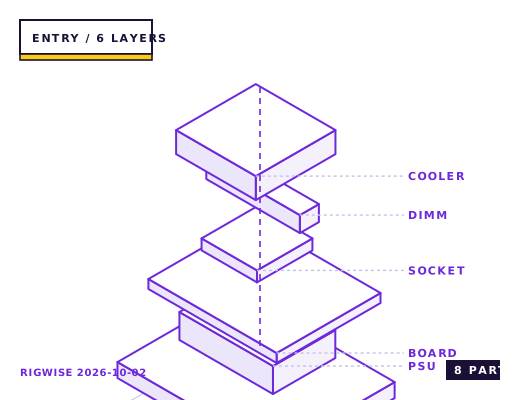
| Slot | Part | Interface | Draw | Price |
|---|---|---|---|---|
| CPU | AMD Ryzen 5 7600 (has integrated graphics for troubleshooting) | AM5 | 65 W | $189 |
| Motherboard | MSI PRO B650-P WIFI (EZ Debug LED) | AM5 | — | $149 |
| Memory | Crucial Pro DDR5-5600 CL46 2x16GB | DIMM | — | $79 |
| GPU | ASRock Challenger Radeon RX 7600 8GB | PCIe 4.0 x16 | 165 W | $239 |
| Storage | Crucial P3 Plus 1TB NVMe | M.2 2280 | 5 W | $62 |
| Cooler | Thermalright Assassin X 120 R SE | AM5 | — | $25 |
| PSU | MSI MAG A650BN 80+ Bronze | ATX | — | $55 |
| Case | Montech AIR 100 ARGB | mATX | — | $55 |
| Total | 235 W | $853 | ||
Why these parts
The first three checks (two minutes)
One: is the power supply switch on, and is the 8-pin EPS CPU cable plugged into the motherboard and not into a PCIe socket? The two connectors look similar on modular PSUs and plugging a PCIe cable into the CPU header destroys the board. Check the labels on both ends.
Two: is the front panel power switch connected to the right two pins? Every board has a different header layout and a switched pair is the most common build error after the EPS cable. Short the two power pins with a screwdriver to test — if the machine starts, the header is the problem, not the board.
Three: is the memory in the correct pair of slots? With two sticks on a four-slot board, use slots A2 and B2 (the second and fourth from the CPU). Slots A1/B1 will often fail training entirely.
The next four (five minutes)
Four: remove the graphics card and try the board's own display output if the CPU has integrated graphics. If it posts without the card, the card or the riser is the fault.
Five: reseat the memory with the latches fully open and both ends clicking. A stick that is 0.5 mm out of the slot fails memory training silently and produces a black screen with fans spinning.
Six: clear CMOS. A board that shipped with an EXPO profile applied by a previous owner or a factory test will not post with a different memory kit.
Seven: check the CPU socket for bent pins with a phone camera zoomed in. AMD's AM5 socket pins are on the motherboard, and a single bent pin produces exactly the symptom of 'fans spin, no display'.
What the debug LEDs are telling you
Most boards have four LEDs labelled CPU, DRAM, VGA and BOOT. The one that stays lit is the stage that failed. A light stuck on DRAM means memory training, not a dead board — reseat, clear CMOS, and try one stick at a time.
A light stuck on CPU with a brand-new board usually means the BIOS does not know the CPU. If the board has BIOS Flashback, update the firmware before doing anything else. If it does not, this is the point where you need a compatible older chip.
If the VGA light is lit and you have a card in the top slot, move it to the second slot. A PCIe slot that has never been used can have debris or a poor contact on a brand-new board.
Bottleneck note
In a machine with no POST, the bottleneck is neither the CPU nor the GPU — it is one of about six physical connection errors. Work through them in order rather than reseating everything at random.
Cooling headroom
A CPU cooler that is not making contact is a genuine no-POST cause on some boards — the CPU overheats during memory training and shuts down in under ten seconds. Check that the cooler's protective film is removed and that the mounting screws are tightened in a diagonal pattern.
Verdict
Work the list in order and you will find it in ten minutes. Reseating everything at once means you learn nothing and may introduce a second fault.
Same tier, other sheets
Tick each check once you have verified it. Ticks are stored in this browser only.
Why each check matters
The CPU 8-pin and the PCIe 8-pin look identical — how do I tell them apart?
PCIe 8-pin has a different keying on the 12 V pins (four rounded, four square) and its cable is usually labelled PCI-E on the connector. The EPS cable is keyed 4+4 or 8-pin with a different latch. Never force a connector that does not slide in without pressure.
The DRAM LED is on and fans spin — how long should I wait?
Give it up to 90 seconds on the first boot with EXPO enabled: DDR5 memory training runs before the display initialises. If it is still on after two minutes, power off, clear CMOS, and boot with a single stick in slot A2.
I plugged the monitor into the motherboard and get nothing — why?
Your CPU may have no integrated graphics (7500F, 7800X3D, 9800X3D and most F-suffix Intel parts do not), or the board's video output is disabled when a discrete card is installed. Use the graphics card's output.
The machine powers on for half a second then off — what causes that?
Usually a short between the board and the case tray, most often an extra standoff under a spot with no mounting hole. Remove the board and count the standoffs against the board's hole pattern. It can also be a bent CPU socket pin.
How do I power on a board with no front panel connected?
Touch a flathead screwdriver across the two pins labelled PWR_SW or PW+ and PW-. That shorts them just like a switch. This is the fastest way to separate a dead board from a miswired front panel.
Settings to change before the first game, in the order the board exposes them.
BIOS
Once it posts, go straight to the BIOS and enable EXPO, set the fan curves, and update to the latest BIOS revision. Do not install the OS first and update later; a BIOS update clears settings and you will redo the fan curves anyway.
- The first three checks (two minutes)
One: is the power supply switch on, and is the 8-pin EPS CPU cable plugged into the motherboard and not into a PCIe socket? The two connectors look similar on modular PSUs and plugging a PCIe cable into the CPU header destroys the board. Check the labels on both ends.
- The next four (five minutes)
Four: remove the graphics card and try the board's own display output if the CPU has integrated graphics. If it posts without the card, the card or the riser is the fault.
- What the debug LEDs are telling you
Most boards have four LEDs labelled CPU, DRAM, VGA and BOOT. The one that stays lit is the stage that failed. A light stuck on DRAM means memory training, not a dead board — reseat, clear CMOS, and try one stick at a time.
What to change first when this machine stops being enough.
- If none of the twelve points resolves it, the next step is swapping known-good parts one at a time, starting with the power supply.
- A cheap PSU tester that shows the 12 V, 5 V and 3.3 V rails under load costs about $25 and answers in ten seconds what takes an hour by substitution.
- If the board has a post code display (two hex digits), the manual's table is far more precise than the four debug LEDs.
Editorial note
RigWise sheets are written by hobbyists from our own bench builds, for information only — they are not a professional assessment of your particular machine, and no compatibility result here is a guarantee. Where a step involves mains wiring or a part you have not handled before, get a qualified second opinion before you buy or power on.